替换Anzhiyu失效的原版Hexo时钟插件方案
近期,和风天气官方彻底关闭了旧版简易天气接口:
1 | https://widget.qweather.net/simple/static/js/he-simple-common.js?v=2.0 |
已经无法正常访问,导致使用 Anzhiyu 的 hexo-butterfly-clock-anzhiyu 插件 的博客全部出现时钟加载失败的情况
为了解决时钟组件完全不可用的问题,我将旧方案彻底移除,并迁移了新的插件:
hexo-butterfly-clock-remake
整体视觉和功能与原版一致,同时使用了和风天气最新接口,兼容性与稳定性更好。
插件项目地址
GitHub 仓库:
https://github.com/hoochanlon/hexo-butterfly-clock-remake
一、卸载旧插件
如果你使用过旧版时钟方案,务必先卸载它们:
1 | npm uninstall hexo-butterfly-clock |
二、安装新版插件
1 | npm install hexo-butterfly-clock-remake |
注意:
该插件依赖 和风天气开发者 API。你需要前往注册并获取自己的:
- API Host(需手动在前面加
https://)注意这里,作者并没有提到,但不加会报错 - API Key
和风天气控制台:
三、配置使用(站点配置或主题配置均可)
在 _config.yml 或 _config.butterfly.yml 中加入以下内容:
1 | # electric_clock |
四、关键参数说明
| 参数 | 类型 | 说明 |
|---|---|---|
| enable | true/false | 必填,插件总开关 |
| priority | number | 可选,Hexo 过滤器执行顺序 |
| enable_page | path/all | 应用页面,可填路径或 all |
| exclude | path | 需要排除的页面列表 |
| layout.type | id/class | 插入的目标容器类型 |
| layout.name | string | 插入的目标容器名称 |
| insert_before | string | 插入到某元素前(二选一) |
| insert_after | string | 插入到某元素后(二选一) |
| loading | URL | 加载动画图 |
| clock_css | URL | 时钟 CSS |
| clock_js | URL | 时钟 JavaScript |
| qweather_api_host | URL | 和风天气 API host,必须加 https:// |
| qweather_key | string | 和风天气 key |
| default_city | string | 可选,默认城市,未设置则根据 IP 定位 |
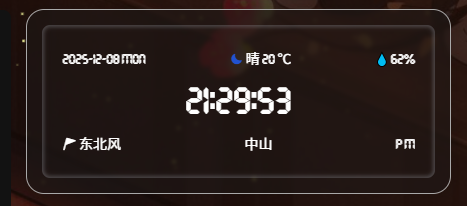
五、切换结果展示
使用新版插件后,时钟组件恢复正常工作,并与旧版保持一致的视觉效果:
本博客所有文章除特别声明外,均采用 CC BY-NC-SA 4.0 许可协议。转载请注明来源 Veeink's Blog!
相关推荐

2025-12-13
Hexo时钟插件,修改自 hexo-butterfly-clock-remake ,新增高德地图 IP 定位支持 以及 发布 npm 包
最近在维护博客侧边栏时,遇到了一次非常典型、也非常“真实”的问题: 最近刚换上的 Hexo 时钟插件,突然因为第三方 API 挂了,直接失效。 这篇文章记录了我从问题出现到完整解决的全过程,包括插件改造与 npm 发布。 这篇文章会讲什么 排查 hexo-butterfly-clock-remake 失效原因 自行修改并重写 IP 定位逻辑 接入 高德地图 Web 服务 API 打包并发布 自己的 npm 插件 完成 Hexo 插件的安装与更新 一、问题背景:IP 定位接口失效我上一篇 Blog 使用的是下面这个插件: hexo-butterfly-clock-remake用于 Butterfly 主题侧边栏显示:时间 + 天气 + 城市 原插件依赖的 IP 定位接口为: https://api.vore.top/api/IPdata 某天开始出现异常,表现为: 插件完全不渲染 浏览器控制台请求失败 结论非常明确: 第三方 IP 定位 API...

2024-12-10
hexo butterfly更改为一图流加单图显示后background不显示最终解决方案
前提 在上篇文章我写了其中一种解决方法,但思考本质原因是我用了一图流后,我重新查看代码,终于发现了最终解决方案,不废话直接说结论。 背景: hexo butterfly 5.2.2 github cloudflare page 解决方法以及思路进入[BlogRoot]\themes\butterfly\layout\includes\layout.pug文件中(BlogRoot为根目录)。 之前我使用了别的博主的一图流再加pages页单图,修改成大概这样子 最终通过console发现我输入的值都是正常的,就是这个#web_bg无法创建出来,所以我怀疑不给予参数是无法根据默认参数生成,所以我模仿page页面的写法重新给默认的#web_bg赋值。 12345if theme.background if page.background #web_bg(style=`background:`+ page.background + `;background-attachment: local;background-position:...

2024-12-10
hexo butterfly更改为一图流后background不显示解决方法
前提 :前端时间在搭建hexo的使用butterfly主题后想参考一图流去修改背景图,发现按说明修改完后,background怎么修改地址,无论是本地还是链接都无法显示出来,后来经排查后发现是缺了文件,所以这里提出来一个解决思路,如若不行还请继续努力。 背景: hexo butterfly 5.2.2 github cloudflare page 解决方法进入[BlogRoot]\themes\butterfly\source\css\var.styl文件中(BlogRoot为根目录)。 在大概35行的位置查看$text-line-height = 2和$index_top_img_height = hexo-config('index_top_img_height') ? convert(hexo-config('index_top_img_height')) : 100vh之间是否有如下代码 123$text-line-height = 2$web-bg = hexo-config('background')...

2024-12-30
新图床折腾记
最近这几天真的很烦!为了让图床支持 WebP 格式,我做了很多尝试,折腾了各种方案,效果却总是不尽人意。写下这篇博客,也算是记录下自己的探索过程,希望对后来者有所帮助。 初始尝试:Cloudflare R2一开始,我尝试使用 Cloudflare R2 作为图床的存储后端。R2 本身是一个不错的对象存储服务,价格低廉且性能优越,我也一直在用它做其他项目的文件存储。然而,在把 R2 嵌入我的代码时,问题接踵而至: 集成复杂:R2 的 API 和我的现有框架不太兼容,需要额外的开发工作。 缺乏现成方案:针对 R2 的开源图床项目非常少,自己从零开发显然超出了时间成本预算。 尝试了几天后,我不得不暂时放弃 R2 的方案。 转机:发现 Cloudflare-ImgBed 项目在我几乎决定放弃时,偶然间发现了一个让我眼前一亮的开源项目:MarSeventh/CloudFlare-ImgBed。这个项目基于 Telegraph Image 进行了全面改造,正好解决了我遇到的所有痛点: 支持 WebP 和 SVG 格式:原生支持,上传无障碍。 支持 R2...

2024-12-28
telegraph-image上传原文件方案
原因 telegraph image的默认设置sendPhoto会使png图片的透明底变成白底,经发现是因为telegram的上传会默认压缩图片。 解决思路 参考telegram上传可以选择不压缩上传,后果就是无法在线预览只能下载下来预览,不过我也不需要telegram预览,所以无所谓。 方法是找到upload.js,把里面的上传方式检测image、audio等直接替换成不检测直接以文件形式sendDocument上传,但是得把信息保存到kv不然会报500,以及最后注释掉image、audio等返回结果。 123456789101112131415161718192021222324252627282930313233343536373839404142434445464748495051525354555657585960616263646566676869707172737475767778798081828384858687888990919293949596979899100101102103104105106107108109110111import...
评论